Default channel types
Several default alert channel implementations are provided out-of-the-box by the alertingImpl component in the
alerting-component-default expansion resourceExpansion Resource (ExpansionResource). A reusable resource bundle containing expanders and features that provide specific application capabilities, defined in the expansion settings and added to the classpath during expansion. (which is also included in the alerting-component resource). As these
implementations are addons that process routed alerts, it just has to be added as a dependency of the applicationApplicationThe overarching model container grouping all components, domain logic, and configurations for an enterprise solution.. No
other component should depend on alertingImpl. All resolution of the channels is implemented by the expandersExpanderA unit of generation that combines a data tree instance (functional M1 model) with a template to generate an artifact. based on
the presence of these channel types in the applicationApplicationThe overarching model container grouping all components, domain logic, and configurations for an enterprise solution..
EmailChannel
The email channel type implemented by alertingImpl::EmailChannel is a channel type that sends alerts over email to a
recipient. Every recipient email address is considered to be an individual channel. The implementation of this channel
type uses the default JEE mailing systemSystemA set of interconnected components that work together to achieve a specific purpose or function., so the majority of the configuration of the email server is done in the
tomee.xml file of the applicationApplicationThe overarching model container grouping all components, domain logic, and configurations for an enterprise solution. server as data sources. The resolution of this configuration is done dynamically
based on the resource name. So multiple email servers can be configured if needed. This channel has full support for
UTF-8 in email body, sender name and recipient name.
The name fieldFieldA property of a DataElement expanded to a database column and user interface input element. is the functional key of this channel and used to reference it from SubscriptionRoute. The config
fieldFieldA property of a DataElement expanded to a database column and user interface input element. has the option alert.configName, so it is used to store the key
for the config properties group in the alerting.ns.properties file. The emailAddress fieldFieldA property of a DataElement expanded to a database column and user interface input element. (required) contains the
email address of the recipient and the recipientName fieldFieldA property of a DataElement expanded to a database column and user interface input element. (required) contains the name of the recipient.
The properties for this channel have the following keys:
from.email(required): Sender email address.from.name(required): Sender name.mailSession(required): Identifier of the mail session resource intomee.xmlthat should be used.template(optional): The string template that should be used to generate the body of the email. (Default:/net/democritus/alerting/impl/alerts/alert_email_body.stg)
alerts.emailChannel.default.from.email=noreply@example.com
alerts.emailChannel.default.from.name=Spammer1337
alerts.emailChannel.default.mailSession=mailSession_1
To use this properties group, the config fieldFieldA property of a DataElement expanded to a database column and user interface input element. of a channel would have the value default.
Templating
An alternative template can be supplied by setting the template property to the resource path of a new stg file. Aside
from the default mappings, the EmailChannel also adds the following mappings:
channel.recipient: Maps to the name of the recipient as set inEmailChannel.recipientName.
Default template
The default email template will look something like this:
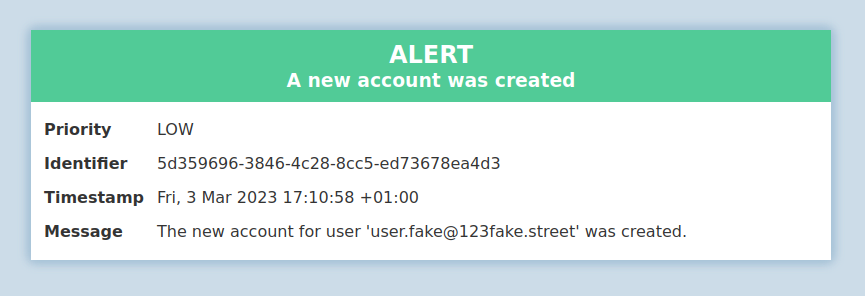
Depending on the alert priority, the color of the header will change:
- NONE
- LOW
- MEDIUM
- HIGH
- CRITICAL
SlackChannel
The Slack channel type implemented by alertingImpl::SlackChannel is a channel type that sends alerts over
Slack to a channel (a channel can also be a user channel). All configuration of this channel type
is done through the alerting.ns.proprties file and the DataElement itself.
The name fieldFieldA property of a DataElement expanded to a database column and user interface input element. is the functional key of this channel and used to reference it from SubscriptionRoute. The config
fieldFieldA property of a DataElement expanded to a database column and user interface input element. has the option alert.configName, so it is used to store the key
for the config properties group in the alerting.ns.properties file. The channel fieldFieldA property of a DataElement expanded to a database column and user interface input element. (required) contains the
channel identifier of the Slack channel that the alert should be sent to. The channel identifier can be found by opening
the channel details page for a channel, where the identifier is shown at the bottom. To send a notification to a user,
use their member ID instead. This can be found in the additional options menu on their profile.
The properties for this channel have the following keys:
apiToken(required): The Slack API token for the Slack applicationApplicationThe overarching model container grouping all components, domain logic, and configurations for an enterprise solution. to send notifications with. This should be a bot token, which starts withxoxb-.template(optional): The string template that should be used to generate the body of the email. (Default:/net/democritus/alerting/impl/alerts/alert_slack.stg)
alerts.slackChannel.default.apiToken=xoxb-my-token-here
To use this properties group, the config fieldFieldA property of a DataElement expanded to a database column and user interface input element. of a channel would have the value default.
Templating
An alternative template can be supplied by setting the template property to the resource path of a new stg file. Aside
from the default mappings, the SlackChannel does not any additional mappings.
Default template
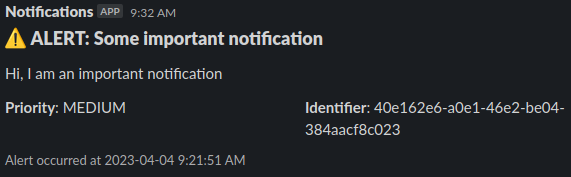
The default Slack template will look something like this:
PushoverChannel
The Pushover channel type implemented by alertingImpl::PushoverChannel is a channel type that sends alerts over the
Pushover notification service, which is a service to send push notifications to a mobile app
using a web API. All configuration of this channel type is done through the alerting.ns.proprties file and the
DataElement itself.
The name fieldFieldA property of a DataElement expanded to a database column and user interface input element. is the functional key of this channel and used to reference it from SubscriptionRoute. The config
fieldFieldA property of a DataElement expanded to a database column and user interface input element. has the option alert.configName, so it is used to store the key
for the config properties group in the alerting.ns.properties file. The targetKey fieldFieldA property of a DataElement expanded to a database column and user interface input element. (required) contains the
key of the Pushover channel which an alert should be sent to. This can be either a user key to directly push to a user
or a group key to push to a delivery group.
The properties for this channel have the following keys:
appToken(required): The applicationApplicationThe overarching model container grouping all components, domain logic, and configurations for an enterprise solution. token that is generated by Pushover for the applicationApplicationThe overarching model container grouping all components, domain logic, and configurations for an enterprise solution. that must be registered to send push notifications through the API. Each applicationApplicationThe overarching model container grouping all components, domain logic, and configurations for an enterprise solution. should be registered separately, so notifications from different applicationsApplicationThe overarching model container grouping all components, domain logic, and configurations for an enterprise solution. can easily be identified.
alerts.pushoverChannel.default.appToken=123thisIs4tOken
To use this properties group, the config fieldFieldA property of a DataElement expanded to a database column and user interface input element. of a channel would have the value default.
Implementation
The PushoverChannel does not currently use the templating engine, as Pushover offers an API with specific fieldsFieldA property of a DataElement expanded to a database column and user interface input element. to provide. Though the message itself can be formatted, this was excluded for simplicity.
The alert priorities are mapped to Pushover priorities as follows:
| AlertPriority | Pushover |
|---|---|
CRITICAL | EMERGENCY |
HIGH | HIGH |
MEDIUM | NORMAL |
LOW | LOW |
NONE | LOWEST |
LoggingChannel
The Pushover channel type implemented by alertingImpl::LoggingChannel is a very simple channel type that writes alerts
to logs. This is mainly intended to test and debug the setup of the alerting component. It has no configuration other
than the channel name fieldsFieldA property of a DataElement expanded to a database column and user interface input element., which is the functional key of this channel and used to reference it from
SubscriptionRoute.
Implementation
The alert priorities are mapped to logging severities as follows:
| AlertPriority | Severity |
|---|---|
CRITICAL | ERROR |
HIGH | ERROR |
MEDIUM | WARNING |
LOW | INFO |
NONE | DEBUG |