Creating relationships with link fields
In software architecture, defining relationships between data objects is essential for modeling the real world accurately. In the euRent systemSystemA set of interconnected components that work together to achieve a specific purpose or function., for example, a Booking is inherently connected to a Car and a Person (the customer). We establish these relationships in Normalized SystemsSystemA set of interconnected components that work together to achieve a specific purpose or function. using a LinkField.
You may have noticed that the Booking Data ElementData Element (DataElement). A fundamental data concept or entity within an application's domain, acting as an anthropomorphic translation of a real-life object or concept. currently lacks any reference to the Car it reserves or the Person who made the reservation. We must introduce these references now.
Creating Link Fields
A LinkField allows one Data ElementData Element (DataElement). A fundamental data concept or entity within an application's domain, acting as an anthropomorphic translation of a real-life object or concept. to reference another. When creating a LinkField, the key parameters you define are:
- Target Element: Specifies which Data ElementData Element (DataElement). A fundamental data concept or entity within an application's domain, acting as an anthropomorphic translation of a real-life object or concept. is being linked to (e.g., rentWork::Car).
- Type: Defines the cardinality of the relationship (one-to-many, many-to-many, etc.). In NS, this is represented by a specific code (e.g., Ln02).
Important Relationship Logic:
- One Booking is made by one Person.
- One Booking is for one Car.
- One Car can be referenced by many Bookings.
- One Person can be referenced by many Bookings.
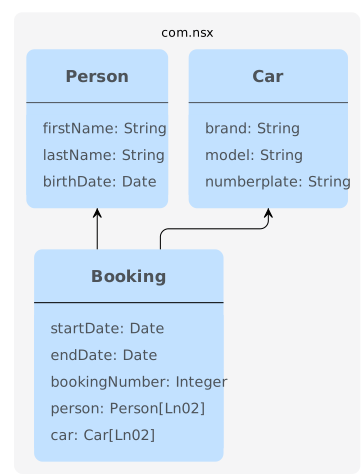
This results in a Many-to-One relationship from Booking to both Car and Person. The corresponding relationship type code is Ln02.
Add the following two Link FieldsFieldA property of a DataElement expanded to a database column and user interface input element. to the Booking Data ElementData Element (DataElement). A fundamental data concept or entity within an application's domain, acting as an anthropomorphic translation of a real-life object or concept.:
| Name | Add to info | LinkField | TargetElement | Type |
|---|---|---|---|---|
| car | ✅ | ✅ | rentWork::Car | Ln02 |
| person | ✅ | ✅ | rentWork::Person | Ln02 |
To reference the linked element, we can also specify its relationship in the name of the fieldFieldA property of a DataElement expanded to a database column and user interface input element., such as 'rentedCar' or 'renter'.
Link FieldsFieldA property of a DataElement expanded to a database column and user interface input element. define the connections between your data entities directly within the model. This model is then processed by the NS ExpandersExpanderA unit of generation that combines a data tree instance (functional M1 model) with a template to generate an artifact. to automatically generate the necessary database schemas and relationship-managing code.
Visualizing the data model
A key advantage of using the Micro RadiantMicro Radiant (MicroRadiant). The graphical modeling IDE and tooling environment used to design, edit, and maintain NS applications and project models. is its ability to visualize complex models, helping analysts and developers understand entity relationships quickly.
- Click the diagram icon located on the right side of the editor screen.
- At the top of the diagram view, ensure you select the Data ElementsData Element (DataElement). A fundamental data concept or entity within an application's domain, acting as an anthropomorphic translation of a real-life object or concept. option.
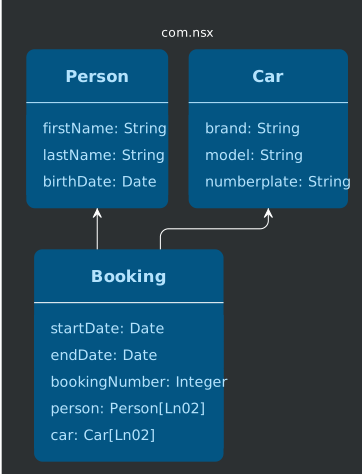
The Micro RadiantMicro Radiant (MicroRadiant). The graphical modeling IDE and tooling environment used to design, edit, and maintain NS applications and project models. will now display an Entity Relationship Diagram (ERD) that clearly shows your three core elements (Car, Person, Booking) and the one-to-many relationships that flow from Booking to the other two entities.