Creating a New Expanders
When you have the latest version of the nsx-support plugin, you will be able to create new expandersExpanderA unit of generation that combines a data tree instance (functional M1 model) with a template to generate an artifact. using IntelliJ:
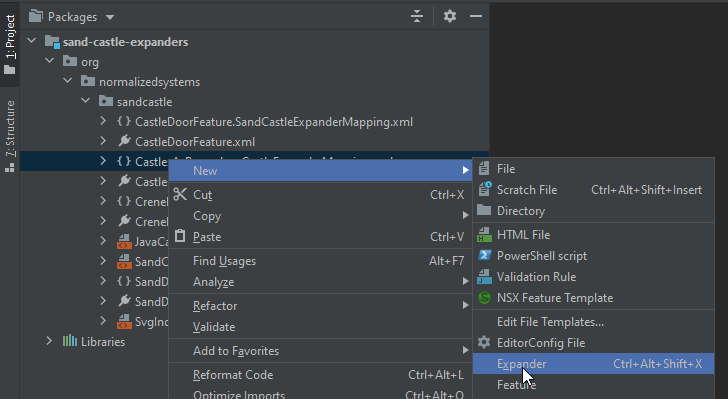
This will open a form:

What it generates
After submitting the expanderExpanderA unit of generation that combines a data tree instance (functional M1 model) with a template to generate an artifact., the plugin will generate 5 files:
- An
{Expander}.xmlfile, which contains the information on the expanderExpanderA unit of generation that combines a data tree instance (functional M1 model) with a template to generate an artifact. needed by the expansion control layerLayerLogical separation of functionality within a single system/application, focused on code organization. - An
{Expander}.stgfile, which contains the template for the expanderExpanderA unit of generation that combines a data tree instance (functional M1 model) with a template to generate an artifact.. It uses StringTemplate 4 as templating engine. - An
{Expander}Mapping.xmlfile, which describes the transformation of the raw input to a model used in the template. - An
{Expander}Test.javafile, which contains the unit tests. - An
{Expander}Test.stgfile, which contains templates used by the unit tests.
The plugin will automatically group all files of the expanderExpanderA unit of generation that combines a data tree instance (functional M1 model) with a template to generate an artifact. in the navigation. The best way to work with expandersExpanderA unit of generation that combines a data tree instance (functional M1 model) with a template to generate an artifact. is to select the Packages view, because this will show the source files and test files together:

Some things to know
- The package name will be automatically filled in with the package you've selected when opening the form
- ExpanderExpanderA unit of generation that combines a data tree instance (functional M1 model) with a template to generate an artifact. names should be PascalCase and always end with 'ExpanderExpanderA unit of generation that combines a data tree instance (functional M1 model) with a template to generate an artifact.'
- The element type can be one of the available elements or can be edited freely in case you are working with a custom meta-model
- LayerLayerLogical separation of functionality within a single system/application, focused on code organization., Technology and SourceType will decide where the expanded artifactArtifactA build or deployment result, such as a Docker container image or Java archive, produced by a software project. will be located and when it will be expanded. E.g. DATA_LAYER expandersExpanderA unit of generation that combines a data tree instance (functional M1 model) with a template to generate an artifact. will be skipped on option
noDataLayerand KNOCKOUT expandersExpanderA unit of generation that combines a data tree instance (functional M1 model) with a template to generate an artifact. will only be expanded if the technology is enabled - Settings chosen in the form can later be modified in the expanderExpanderA unit of generation that combines a data tree instance (functional M1 model) with a template to generate an artifact. xml file if necessary
Next: Learn about defining the name and location of the expanded artifactArtifactA build or deployment result, such as a Docker container image or Java archive, produced by a software project. in Artifact Paths