Angular Beam 0.2.0 (angular-expanders 7.0.0)


Changes and improvements
Upgrade to Angular 21 and Angular Material 21
For this release we updated all the code to Angular 21, in order to stay up to date with the releases and best
practices.
Added DataProjection support
A mechanism has been implemented to facilitate fetching of different DataProjections if the used control layer allows
this (std-api). The defaults are set to details for getSingle calls and info for getList calls. This
implementation also allows the use of calculated fields with the info projection now.
Double check in your application if the same table columns are still shown. The option cruds.table.hide is now also
taken into account.
For the moment, the possible projections are set by a ModelLoadingListener that defaults to the info
($DataConnector$-table.model.ts) and details ($DataConnector$.model.ts) projections. In the future it will be
possible to manually define other projections as well.
Added Finder support
We have added a FinderConnector and QueryConnector that implements the new abstract FilterConnector. This
allows to support finders as well as querysearch at the same time (depending on what control layer you are using).
The option hasSearchBar has also been ported. Like in KO this will expand a
searchbar in the header of the list page connected to a finder defined by the specified value of the option.
Related to the addition of a universal Filter feature, previously only one querysearch was supported to be used as a
filter. This has been changed to any amount of querysearches and finders.
Added Authorization support
We have added AuthorizationRights to make certain parts of the application not accessible (used in guards,
directives, services). These rights can be accessed through the ACTION_AUTHORIZATION_SOURCE InjectionToken,
the interface can be provided by a control layer specific implementation, or you can provide your own. Some directives have been added to handle authorization on the most common used components
ButtonAuthorizationDirectiveTableRowActionMenuAuthorizationDirective
These directives handle disabling components as well as showing tooltips on why it is disabled. You can look at these as examples when wanting to use the authorization feature somewhere else.
Added support for swapping out default add/edit with DataOperations
Using the following tags you can now conditionally turn of some expanders:
#angular.data-view.action.add.custom: disable default add page.#angular.data-view.action.edit.custom: disable default edit page.#angular.data-view.action.delete.custom: disable default delete dialog.#angular.data-view.routing.add.disable: disable the add route.#angular.data-view.routing.edit.disable: disable the edit route.- Added feature anchors to remaining
DataViewactions (add, edit, delete, details, list).
Refactored use of HttpClient
We have added an API specific HttpClient. This allows for easy changing of authentication headers, error handling
etc. per different API implemented. The implicit behavior of the http interceptors is also now removed. To facilitate the removal of the use of interceptors a lot of operator functions that handled the logic of the interceptors have been created.
handleDataAccessErrorhandleAlertErrorhandleDataAccessFormErrornotifyDataConnectorSuccessEventnotifyDataConnectorFailureEvent
The new client is still based on the angular HttpClient and all functionality of this client can still be used.
Metamodel changes and additions
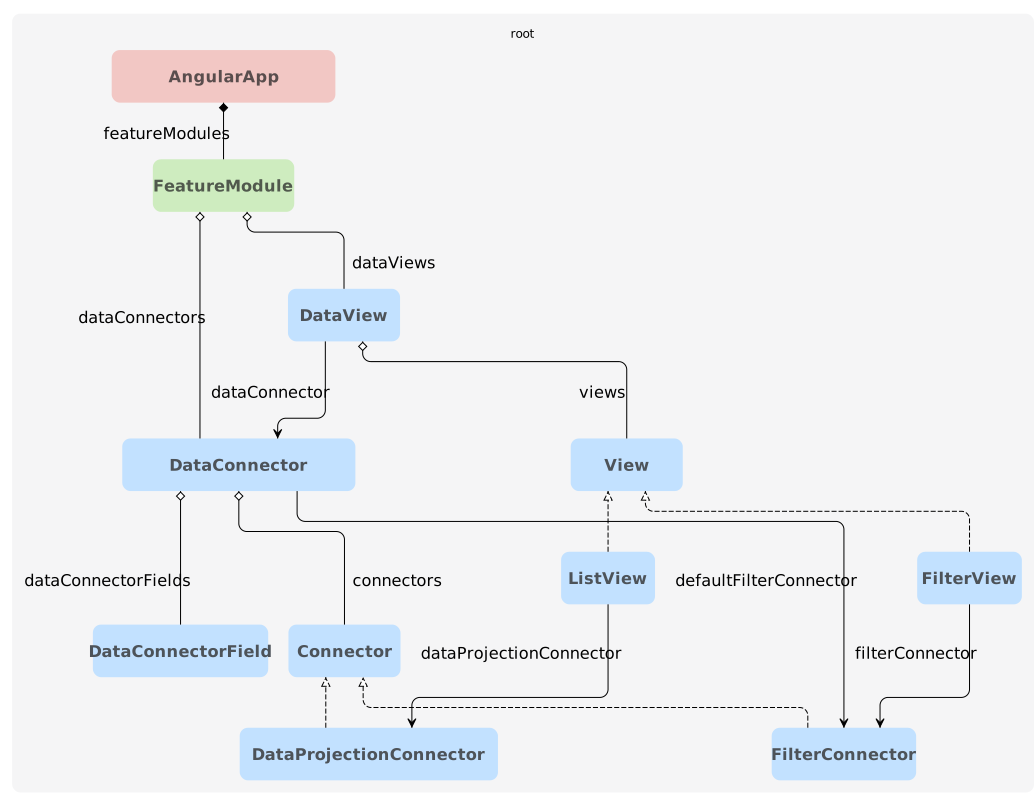
Metamodel additions of abstract Connector and View. This allows for easier extension of different types of views
(e.g. ListView, InstanceView, FilterView) or connectors (e.g. DataProjectionConnector, DataOperationConnector,
...).
- Allowed file type validation
- Dynamic sidebar support
- New
functionsfolder in structure - Resolved filename encoding issues
- Added error handling for std-api
Migration guide
Beam usage
Instead of individually defining the various angular expansion resources, please use the angular-beam. This is the way angular should be used. The beams are curated and tested thoroughly.
When using angular in combination with the standard-api as the control layer you should use the following.
<expansionResources>
  ...
  <expansionResource name="org.normalizedsystems.beam:angular-beam" version="0.2.0"/>
  <expansionResource name="net.democritus.angular.stdapi:angular-stdapi-expanders" version="3.6.2"/>
  <expansionResource name="org.normalizedsystems.beam:standard-api-beam" version="1.1.0"/>
</expansionResources>
When using angular in combination with the service-api as the control layer you should use the following.
<expansionResources>
  ...
  <expansionResource name="org.normalizedsystems.beam:angular-beam" version="0.2.0"/>
  <expansionResource name="net.democritus.angular.svcapi:angular-svcapi-expanders" version="3.6.1"/>
  <expansionResource name="org.normalizedsystems.beam:service-api-beam" version="1.2.0"/>
</expansionResources>
In contrast to version 0.1.0 of the angular-beam. The angular-stdapi-expanders and angular-svcapi-expanders need to be added separately.
This is done to help dependency resolution only resolve the necessary expansion resources.
Upgrade to Angular 21
Normally you shouldn't have any issues, you can look at the migration guide to see what changes in custom code need to be done.
Some notable changes are:
- We removed
@angular/animations, this is being deprecated. However, if necessary it can be re-added as custom code in thepackage.json5file and provided in theapp.config.ts. - Control flow syntax migration, Angular is planning
on removing the
ngIf,ngFor, ... directives in Angular 22. They deprecated them a while ago, so it is best to start switching to the control flow syntax. - Lastly, we also upgraded to version
17.0.0ofngx-translate. They deprecated some methodes and the direct calling of variables in their services. You can look at their migration guide for the preferred changes.
Type checking in templates have become stricter, and you will potentially have to explicitly define some types in your TypeScript files.
Jenkins pipeline
Some projects had issues on jenkins after migrating. This was due to the fact that . files are not always
copied over. Please make sure that in the folder you do yarn build the .yarnrc.yml file is present. Possibly
change how you copy the front-end project from the expansion folder, e.g. sh "cp -r expansions/${FRONTEND_NAME}-angular/* docker/frontend/deploy"
changed to sh "cp -r expansions/${FRONTEND_NAME}-angular/. docker/frontend/deploy"
Upgrade dependencies
net.democritus:querysearch-expanders::3.5.1+ is required.
Use any of the following or make sure the minimum required querysearch-expanders version is provided elsewhere.
org.normalizedsystems.beam:service-api-beam::1.2.0+org.normalizedsystems.beam:standard-api-beam::1.1.0+
Added DataProjection support
A ListView element is automatically linked to a DataProjectionConnector for the info projection. If you want
to change this back to the previous default of details, you can do this by using the option angular.legacy.table.useModelProjection.
This option will stay in place until we move away for automatically defining the model with
ModelLoadingListeners and start defining the model explicitly.
While upgrading it is possible that the newly used info projection does not contain some of the fields being
called in custom code. You can either (1) add these fields to the info projection or (2) go back to the details
projection. Often times you can rely on duck typing to handle it correctly, e.g. when needing only the id.
The option angular.isTableColumn has been removed together with the transmuter adding this to all the fields having
the isInfoField attribute. The option is not necessary anymore because this is now handled by the info projection. A
new transmuter has been added that removes this option everywhere and sets theisInfoField attribute to true.
The DataAccess interface has undergone some changes. The defaults allow for no breaking changes in the custom code.
However, the %dataConnector%ListModel has been changed with a generic PaginatedList model from the ns-core
runtime library. The expander for this model has also been removed.
getSingle({ id }: { id: string }): Observable<%dataConnector%Model>;
getList({ segmentParameters }: { segmentParameters?: %dataConnector%SegmentParameters }): Observable<%dataConnector%ListModel>;
getSingle<T extends keyof %dataConnector%Projection = '%dataConnector%'>({ id, projection }: { id: string, projection?: T }): Observable<%dataConnector%Projection[T]>;
getList<T extends keyof %dataConnector%Projection = '%dataConnector%'>({ segmentParameters, projection }: { segmentParameters?: %dataConnector%SegmentParameters, projection?: T }): Observable<PaginatedList<%dataConnector%Projection[T]>>;
To make the DataSource default to a certain projection, the InjectionToken for the DataSource needed to
get a type. For this reason we moved the DataView related tokens to a different file DataView-view.tokens.
Namely, a file expanded by DataView instead of DataConnector. Custom imports using these tokens will need to be updated.
If you don't want change the imports in custom code right away, you can get the tokens back in the original place by
using the option angular.legacy.tokens.
When you have a custom token defined, you should add the type now. This is necessary otherwise the DataSource cannot
be used with multiple projections.
Lastly, when using a *-data-access.service directly, the defaults of the used projection is not respected. This
means that custom code will break, because now you need to define a projection. However, when using the correct
*_DATA_ACCESS InjectionToken this is handled correctly. This will also allow to easily swap implementations
later on. When running into this issue it is recommended to migrate to using the injection token instead of using the service
directly.
We have noticed that having a separate tokens file is actually not necessary. We will start combining the
InjectionToken with the interface in the same file.
Added Finder support
To make the finders work together with querysearch, some things had to change.
- The previous standard querysearch model (now filter) has been changed from an interface to a class. Any places in the code where object instancing is used to create a filter object needs to be changed to a new class instance using:
  const filter = new FooBarFilter();
  filter.foo = this.barService.getBarValue();
or wrapping the object in the fromObject() function expanded in the new class:
const filter = FooBarFilter.fromObject({obj: {foo: this.barService.getBarValue()}});
- The token injecting the InfiniteDataSource used for populating the dropdowns in the forms has been changed from
<...>FILTER_DATA_SOURCEto<...>FINDER_FILTER_DATA_SOURCEand<...>QUERY_FILTER_DATA_SOURCEfor finders and queryssearches respectively. - When upgrading from a previous version your previously defined querysearch model file used will have been renamed from
<...>Filtersto<...>Filterresulting in possible breaking code in custom anchors. You can safely assume that changing<...>Filtersto<...>Filterwil fix most issues in custom code and custom imports. - Some imports could have been removed/added from the expanded files resulting in missing/duplicate imports.
- It could be possible that when a DataChild is defined in the model, and you do not have a valid field in the filter of the child pointing to the parent that code will be expanded that will not compile. If you run into this problem, add a field to your filter pointing to the parent.
- The
FilterOptionshave been moved from being calculated in theirFilterOptionResolverto being calculated directly in their respectiveFilterFormComponent(s). If you have any custom code on the list page interacting withfilterOptionsthis will have to be moved to theFilterFormComponent(s)
We understand that some project do not want to immediately change from how filtering previously looked. For this we
added a #angular.filters.legacy root tag. When this is added in your profile, it will attempt to keep the code and
visuals as close as possible to the previous querysearch filtering implementation. However, the new classes and names for the filter models will still be used resulting in possible breaking changes as explained above.
Refactored use of HttpClient
The use of angular interceptors have been removed and moved to the specific clients. When you use the generic angular httpClient the following will no longer occur
- Error mapping (check if error from svc-api and map it to internal error structure)
- Error handling (directly act on an error, e.g. 404)
- File download error handling
- Authentication header addition
Either change to the new expanded api specific HttpClient (preferred) or add these interceptors again as custom code while awaiting the refactor.
return this.httpClient
  .get<X>({url: url})
  .pipe(
    map((document) => this.xModelMapper.map(document))
  );
return this.httpClient
  .get<X>({url: url})
  .pipe(
    map((document) => this.xProjectionMapper.map({document})),
    handleDataAccessError({ injector: this.injector }),
    handleAlertError({ injector: this.injector })
  );
.get(url, {headers: headers, params: params})
get({url: url, options: options})
Some imports are no longer default expanded. These should be added custom if needed in *-data-access.service.ts.
catchErrorAlertErrorModelthrowErrorEMPTYtapfilter
return this.httpClient.get(url, {
    params: params,
    observe: 'response',
    responseType: 'blob',
  });
}
return this.httpClient.downloadFile({
    url,
    options
  }).pipe(
    filter(response => response.type == HttpEventType.Response),
    handleDataAccessError({ injector: this.injector }),
    handleAlertError({ injector: this.injector })
  );
}
The new expanded api specific HttpClient always has a responseType 'json'. This is done for simplicity and it covers most use cases.
For a file download which has the responseType 'blob' a separate method downloadFile is included. However if you need other response types,
you should add your own custom methods to the expanded api specific HttpClient.
create({ model }: { model: DemoElementModel }): Observable<{ id: string }> {
  let headers = new HttpHeaders();
  let data = this.demoElementCreateDocumentMapper.map({ model });
  // anchor:custom-create:start
  // anchor:custom-create:end
  return this.httpClient.post<{ id: string }>(url, data, {headers: headers}).pipe(
    map(response => ({id: response.id})),
    tap(response => {
      this.demoElementEventService.updateEvents({
        event: {
          objectIdentifier: response.id,
          type: 'create'
        }
      })
    }),
    catchError(error => {
      this.demoElementEventService.updateEvents({
        event: {
          objectIdentifier: '',
          type: 'create-failed'
        }
      });
      // anchor:custom-create-error:start
      // anchor:custom-create-error:end
      if (error instanceof AlertErrorModel) {
        this.alertErrorHandler.handleError({error: error});
        return EMPTY;
      }
      return throwError(() => error);
    })
  );
}
create({ model }: { model: DemoElementModel }): Observable<{ id: string }> {
  const url = '/v1/demoelements';
  const options: HttpClientOptions = {};
  let data = this.demoElementCreateDocumentMapper.map({ model });
  // anchor:custom-create:start
  // anchor:custom-create:end
  return this.httpClient.post<{ id: string }>({
    url: url,
    body: data,
    options: options
  }).pipe(
    map(response => ({id: response.id})),
    // @anchor:create-operators:start
    notifyDemoElementSuccessEvent({
      injector: this.injector,
      event: {
        type: 'create'
      }
    }),
    notifyDemoElementFailureEvent({
      injector: this.injector,
      event: {
        type: 'create-failed'
      }
    }),
    handleDataAccessFormError({ injector: this.injector }),
    handleDataAccessError({ injector: this.injector }),
    handleAlertError({ injector: this.injector })
    // @anchor:create-operators:end
  );
}
It is possible to add your own operator functions to the http-client by default. Define your own operator functions in
the anchor:custom-methods of the http-client service or preferably in a separate class in the functions directory.
Then register the operator function in the anchor:custom-default-operators within the #getDefaultOperators method.
-
Custom error anchors have been removed from data access services. Use the existing error mapping classes or add an operator function to the http-client.
-
Removed
error-mapper.interceptor.tsanderror.interceptor.ts. Use the existing error mapping classes or add an operator function to the http-client.
A breaking change has been introduced in the event.model.ts interface where the objectIdentifier attribute has
been made optional. This potentially results in some custom code changes to handle the possible undefined nature.
Try to use DataOperations instead of custom endpoint calls. This will make migration in the future a lot easier,
and you will have all the endpoints defined in your model.
Changed default filtering in dropdowns
Dropdowns (nsc-select components) are no longer searchable by default. You have to add the option
angular.defaultQueryFilter to a QuerySearch to make a data element searchable in the dropdown. This change allows you
to choose the filter that is used for filtering the results in the dropdown.
There is a transmuter which will add this option for you to all querysearches, this will make all the dropdowns work as before. However just as before, if the filter is not implemented the filtering will not work. It is therefore recommended to carefully inspect the changes made by the transmuter and make changes accordingly.
Module-metamodel absorbed in prime-core
If your project started using the module-metamodel to declare dependencies between specific FeatureModules, you
should refactor how these dependencies are defined. The module-metamodel has been absorbed in prime-core and
received a new way of declaration.
- First of, you can remove the
angularAppModules.xmlfile. - In your
angular-app.xmlyou should change the<featureModules>attribute with<dependencies>. - Add a type to your
featureModule.xml.
<angularApp xmlns="https://schemas.normalizedsystems.org/xsd/angularProjects/7/0/0">
  <name>space-app</name>
  <featureModules>
    <featureModule>demo</featureModule>
  </featureModules>
</angularApp>

<featureModule xmlns="https://schemas.normalizedsystems.org/xsd/angularProjects/7/0/0">
  <name>demo</name>
</featureModule>
<angularApp xmlns="https://schemas.normalizedsystems.org/xsd/angularProjects/7/0/0">
  <name>space-app</name>
  <dependencies>
    <dependency>
      <to>local::angular/featureModules/demo/model/demo</to>
      <scope>expansion</scope>
    </dependency>
  </dependencies>
</angularApp>

<featureModule type="angularProjects::FeatureModule" xmlns="https://schemas.normalizedsystems.org/xsd/angularProjects/7/0/0">
  <name>demo</name>
</featureModule>
project
├── conf
├── applications
├── angular
.   ├── angularApps
    .   ├── space-app
    .   .   ├── model
    .       .   └── space-app.xml
    .       .
    .       └── angularAppModules.xml (to be removed)
    ├── featureModules
    .   ├── demo
    .   .   ├── model
    .       .   └── demo.xml
LayerType addedA new ANGULAR_FUNCTIONS LayerType has been added. Please add this to your custom ProgramType if present.
Other
Here is a list of other issues you may encounter during the migration.
-
Some expanded variables are declared with
?instead of!. Custom code using these variables might need to be adapted to handle undefined values. -
The variable
filterOptionsin -form.component.ts files has been updated to be a signal. Call the variable asfilterOptions(). -
The variable
<dataElement>FilterDataSourcein -form.component.ts files has been renamed to<dataElement>QueryFilterDataSource. -
When changing to a profile that enables the data access, you should include the
angular.legacy.authorizationoption on the AngularApp. This will make it so the data access rights defined in the Account component are used. -
<dataElement>.guard.tsfiles are no longer expanded. The logic of these file is now implemented in the<dataElement>-filter-coordinator.directive.tsfiles. -
<dataElement>.filters.tsfiles have been removed. Custom imports need to be changed to use<dataElement>-filters.model.