
NSX Metamodels Progress Update

· 9 min read
Wanaka Mannaert
Wanaka Mannaert
Solution Architect - Product Research

Introduction

As can be seen from the number of minor releases, nsx-metamodels is undergoing heavy construction work. This blogpost aims to clarify the reasoning behind the recent changes, the evolution of the metamodelling practice, and what is still ahead of us.

Please note that this post is quite the heavy read, but breaking down these complex concepts is necessary to explain where we are heading. It is primarily intended for those who have been working with metamodels, as well as anyone considering adopting them, with the objective of being informed of the process.

The most important terminology used in this post:

  • Program
  • ProgramType
  • Module
  • ModuleType
  • M2 model: Refers to a meta-model, ontology or Domain Specific Language, specified in an M3.
  • M1 model: Refers to an actual model, i.e., an instantiation of an M2 meta-model or ontology.

nsx-metamodels: a walk through the latest versions

2026.2.0 - the <dependencies> system

From nsx-metamodels 2025.15.0 until 2026.2.0, support for the <dependencies> system was developed.

Before 2025.15.0, it was not possible to add modules to an already existing ProgramType. If you wanted to add modules to a Program, you had to create an extra ProgramType to support those modules. A new ProgramType entailed its own custom ProgramFactory, which brought a whole new set of issues. The developed <dependencies> system allows you to add modules to a Program and its existing ProgramType without the significant amount of custom code needed before.

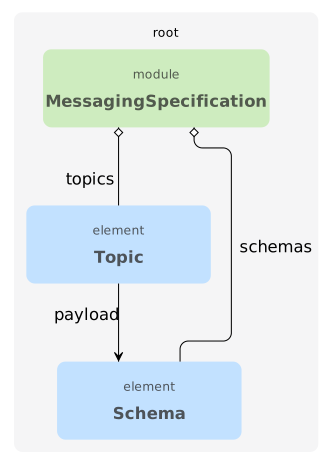
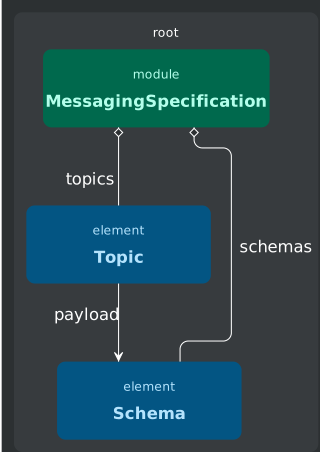
An explanation of this system using the messaging-metamodel example:

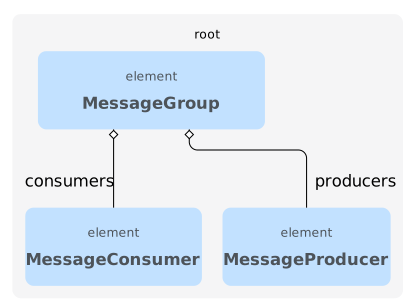
datamodeldatamodel

Messaging Ontology

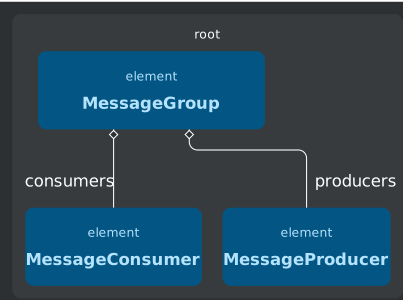
second-image-altsecond-image-alt

MessagingJee Ontology

  • messaging ontology: defines the standalone MessageSpecification module containing topics and schemas.
  • messagingJee ontology: bridges elements and messaging. It defines MessageGroup (containing MessageProducers and MessageConsumers publishing/subscribing to topics) which has an extension reference to elements::Component. This allows a JEE application to contain multiple message groups.

On the M1 level, a jeeApplication (or the specific component) needs to be able to read the target MessageSpecification to relate its producers/consumers to actual topics and payloads. This is achieved via the <dependencies> system:

messageBus.xml
<component name="messageBus" type="elements::Component">
<version>1.0.0</version>
<fullName>messageBus</fullName>
<dependencies>
<dependency>
<to>local::specifications/events/model/events.xml</to>
<scope>expansion</scope>
</dependency>
</dependencies>
</component>

This way, the MessageBus component (a Module) can import the "events" specification and use its topics and schemas.

note

On the M2 level, there is no direct reference between MessageSpecification and Component. The <dependencies> system doesn’t mirror the M2 references 1:1. Instead, it defines where module imports are required to access the information needed to model these M2 references on M1. References are thus defined between elements within modules, dependencies define imports between modules.

What was wrong with this <dependencies> system?

The original <dependencies> system suffered from three main architectural shortcomings:

  1. Tightly coupled to elements: Since the system was defined inside the elements ontology, creating a truly standalone metamodel was impossible without importing elements, defeating the goal of modularity.
  2. Lack of transparency: the system was deeply buried within the elements core, making it obscure and difficult to understand. Besides, “dependency” is a highly overused term, lacking semantic meaning here.
  3. Inability to depend on program: maybe most critically, the system could not resolve M1 level dependencies pointing to a Program. While an M2 reference to an ElementClass with a program role was possible, it failed to interpret on M1. This prevented us from creating a high level connection between two metamodels.

2026.3.0 - the Standalone Metamodel profile

Enter version 2026.3.0. This was the first round of improvements on the nsx-metamodels to deal with both the issues encountered before the <dependencies> system, and the issues of the <dependencies> system itself.

When using 2026.3.0, the following matters are changed as a way of improving the concerns:

  1. A standalone metamodel profile: A new profile was added to 2026.3.0: Standalone Metamodel. This profile is almost identical to Standard Metamodel 3. However, in this profile, the tag #meta.dependencyDeclaration was left out. This tag added an association reference to elements::Dependency on every Program and Module in the metamodel, enforcing an ontologyImport to elements. Thanks to this profile, a standalone metamodel is truly standalone.
  2. Programs can now be referenced to, and depended on: This version allows you to depend on Programs from another ontology. To do so, you define the program as a ModuleType, and thus import it into your model as a module instead of a program. This way, you can reference from program & module to Program on M2 level, and actually resolve this reference on M1 level.

An example:

moduleTypes.xml
<dataResource type="expansionControl::ModuleType">
<moduleType>
<name>NodeBackend</name>
<component>DoleComs</component>
<programType>DoleComs::NodeProgram</programType>
<expandableElement>elements::Application</expandableElement>
<moduleFactory>net.democritus.elements.ApplicationModuleFactory</moduleFactory>
<modelDirectory>$source.rootDirectory$/applications/$application.shortName$/model</modelDirectory>
<sourceDirectory><!-- NO HARVEST --></sourceDirectory>
<expansionDirectory><!-- NO EXPAND --></expansionDirectory>
<scope>reference</scope>
</moduleType>
</dataResource>

Here, we load elements::Application (a Program) as a Module into a different metamodel, with a different Program. And we can then use it like this:

MessagingNodeExample
<node>
<name>MessagingNodeExample</name>
<packageName>com.dolecoms.node</packageName>
<sourceType>JAVA</sourceType>
<dependencies>
<dependency>
<to>local::applications/jeeApp/model/jeeApp.xml</to>
<scope>reference</scope>
</dependency>
</dependencies>
</node>

However, as you can see in the example, version 2026.3.0 still relies on the <dependencies> system to perform the imports on M1 level.

2026.4.0 - Introducing ModuleImports

In the next version (2026.4.0) we introduce the ModuleImports. This mechanism improves the modularity of metamodels and the transparency of connecting modules. Module imports are defined on a Program or Module, and specify which other modules are required to make a Program or Module work. A technical deep dive on the topic can be found here.

Back to our MessageBus example, this is now changed to:

MessageBus.xml
<component
xmlns="https://schemas.normalizedsystems.org/xsd/elements/2025/14/0"
moduleId="components/messageBus/model/messageBus"
type="elements::Component">
<import module="local::specifications/events/model/events.xml" scope="expansion"/>
<name>messageBus</name>
<version>1.0.0</version>
<fullName>messageBus</fullName>
<options>
<configuration.properties/>
</options>
</component>

Every import here specifies the import of a module, to be used in this module (a component called MessageBus). Here, dependencies are merely interchanged by module imports. However, we can now as well couple programs:

MessagingNodeExample.xml
<node xmlns="https://schemas.normalizedsystems.org/xsd/DoleComs/1/2/0-SNAPSHOT">
<import module="local::applications/jeeAppExample/model/jeeAppExample.xml" scope="reference"/>
<name>EmsNode</name>
<packageName>com.dolecoms.node</packageName>
<sourceType>JAVA</sourceType>
</node>

The program Node imports the program Application, an import that used to be impossible.

What is to be expected? What is the final aim of these reworks?

During these efforts to further modularize the metamodels and general project setups, we were able to identify the root cause of our pain points. Our tooling (µRadiant) thus far assumed a strong coupling between the functional and structural (or construction) information.

We consider the functional view to be the what, the system's operational behavior and functionality, i.e. our functional model (think data elements, task elements, etc.), whereas the construction view embodies the how, the system's physical structure and implementation (think expansions, layers, technologies, etc.).

The final aim of this effort is to decouple these two and create a truly modular way of project composition. In order to achieve this, some more sub-objectives need to be built on top of the groundwork we have laid in 2026.3.0 and 2026.4.0:

  • Enable model loading without defining ProgramTypes or ModuleTypes, since these are only needed for expansion. With this, we can reference across modules and programs of various metamodels, and actually instantiate these references on M1 level without the technical worry of creating moduleTypes.
  • Make Programs and Modules truly standalone blocks. We already don’t need the elements ontologyImport anymore, and they can already import one another using module imports. However, to establish its usability, µRadiant support is required.
  • ExpansionSettings should be configurable parallel to the model, not as the root of it. There will be a duality of architecting the functional model, and designing the project / expansion composition.
  • The core of our framework (prime-core) currently always includes the elements ontology. As we increase modularization internally we are making the necessary steps to eventually extract elements from our core and provide it as a separate building block.

What version should I be using now?

We aim to provide a solid experience for these features, especially in our tools. While it is perfectly fine to use the latest release, you should know these new features (ModuleImports and importing Programs) are not yet fully supported in the µRadiant. So we recommend waiting to use these until the total effort is completed. The general advice would be to stick to the lowest version supporting the features you need.

However, in case these modular constructions are necessary, we ask you to tread carefully with the intermediate releases. Version 2026.4.0 does provide stable support for these new features, but lacks µRadiant support and requires some technical deliberation. Technical documentation can be found here.

Angular Beam 0.2.0 (angular-expanders 7.0.0)

· 17 min read
Jan Hardy
Jan Hardy
R&D Engineer
Dries Ryckbosch
Dries Ryckbosch
Engineer

Changes and improvements

Upgrade to Angular 21 and Angular Material 21

For this release we updated all the code to Angular 21, in order to stay up to date with the releases and best practices.

Added DataProjection support

A mechanism has been implemented to facilitate fetching of different DataProjections if the used control layer allows this (std-api). The defaults are set to details for getSingle calls and info for getList calls. This implementation also allows the use of calculated fields with the info projection now.

tip

Double check in your application if the same table columns are still shown. The option cruds.table.hide is now also taken into account.

For the moment, the possible projections are set by a ModelLoadingListener that defaults to the info ($DataConnector$-table.model.ts) and details ($DataConnector$.model.ts) projections. In the future it will be possible to manually define other projections as well.

Added Finder support

We have added a FinderConnector and QueryConnector that implements the new abstract FilterConnector. This allows to support finders as well as querysearch at the same time (depending on what control layer you are using).

The option hasSearchBar has also been ported. Like in KO this will expand a searchbar in the header of the list page connected to a finder defined by the specified value of the option.

Related to the addition of a universal Filter feature, previously only one querysearch was supported to be used as a filter. This has been changed to any amount of querysearches and finders.

Added Authorization support

We have added AuthorizationRights to make certain parts of the application not accessible (used in guards, directives, services). These rights can be accessed through the ACTION_AUTHORIZATION_SOURCE InjectionToken, the interface can be provided by a control layer specific implementation, or you can provide your own. Some directives have been added to handle authorization on the most common used components

  • ButtonAuthorizationDirective
  • TableRowActionMenuAuthorizationDirective

These directives handle disabling components as well as showing tooltips on why it is disabled. You can look at these as examples when wanting to use the authorization feature somewhere else.

Added support for swapping out default add/edit with DataOperations

Using the following tags you can now conditionally turn of some expanders:

  • #angular.data-view.action.add.custom: disable default add page.
  • #angular.data-view.action.edit.custom: disable default edit page.
  • #angular.data-view.action.delete.custom: disable default delete dialog.
  • #angular.data-view.routing.add.disable: disable the add route.
  • #angular.data-view.routing.edit.disable: disable the edit route.
  • Added feature anchors to remaining DataView actions (add, edit, delete, details, list).

Refactored use of HttpClient

We have added an API specific HttpClient. This allows for easy changing of authentication headers, error handling etc. per different API implemented. The implicit behavior of the http interceptors is also now removed. To facilitate the removal of the use of interceptors a lot of operator functions that handled the logic of the interceptors have been created.

  • handleDataAccessError
  • handleAlertError
  • handleDataAccessFormError
  • notifyDataConnectorSuccessEvent
  • notifyDataConnectorFailureEvent
Important

The new client is still based on the angular HttpClient and all functionality of this client can still be used.

Metamodel changes and additions

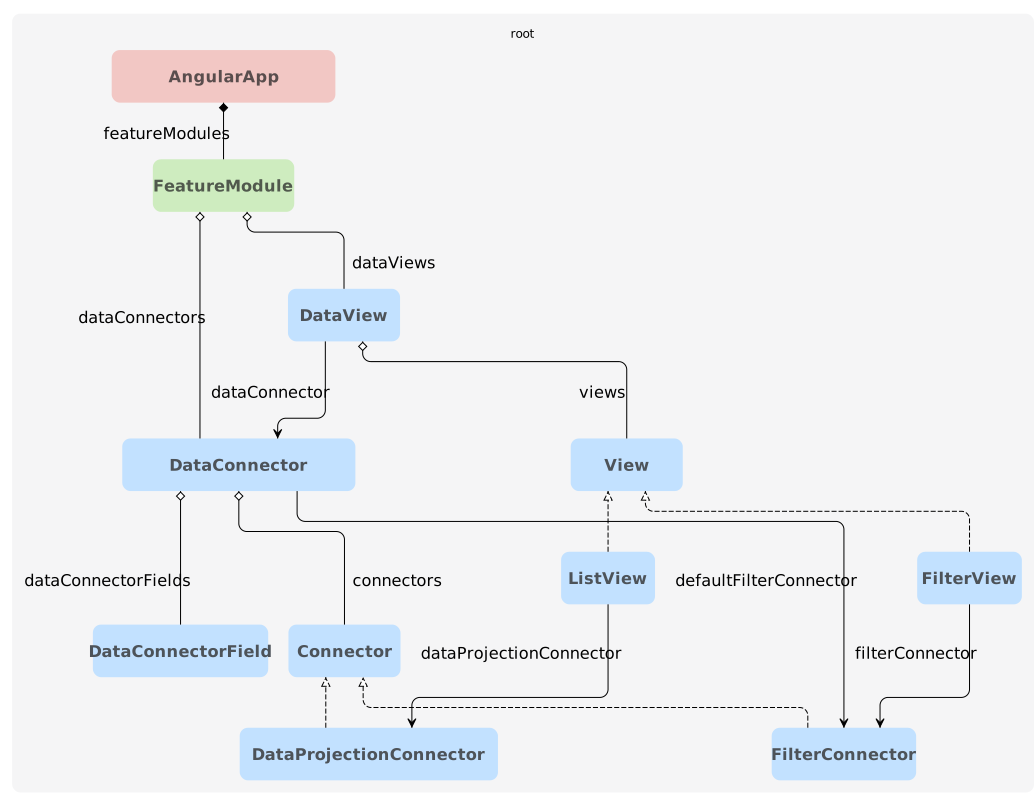
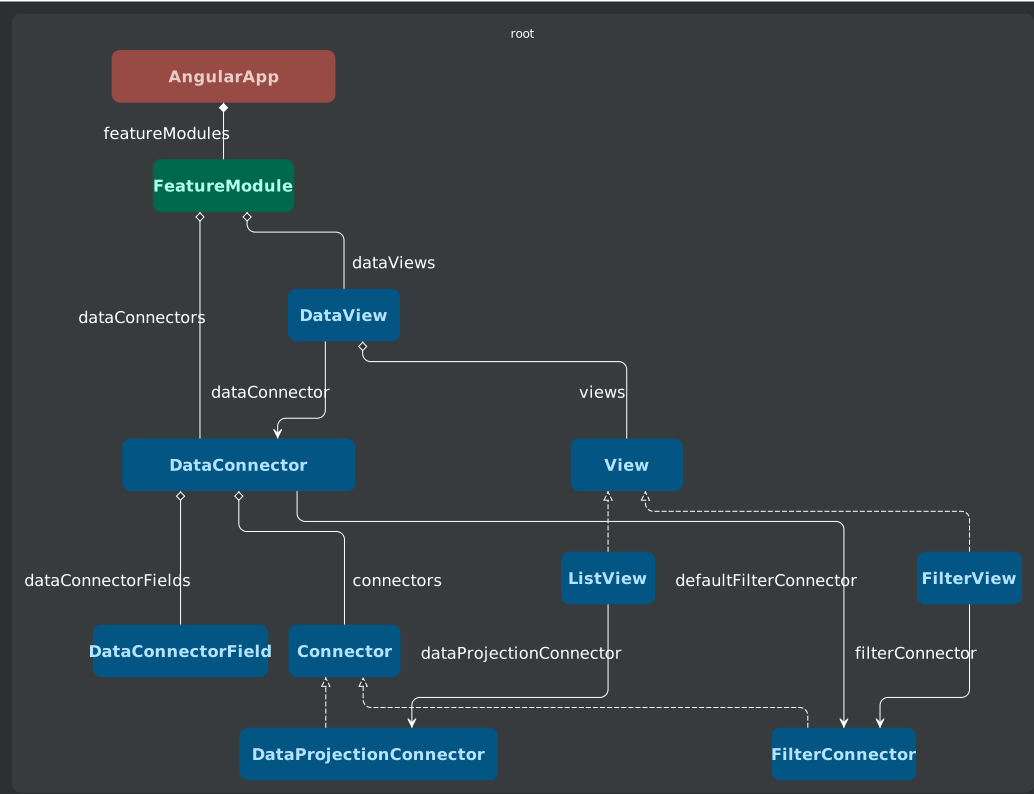
Metamodel additions of abstract Connector and View. This allows for easier extension of different types of views (e.g. ListView, InstanceView, FilterView) or connectors (e.g. DataProjectionConnector, DataOperationConnector, ...).

datamodeldatamodel
For more added features check out the changelog
  • Allowed file type validation
  • Dynamic sidebar support
  • New functions folder in structure
  • Resolved filename encoding issues
  • Added error handling for std-api

Data Operations 2.0.0

· 4 min read
Jorren Hendriks
Jorren Hendriks
R&D Engineer

Changes and improvements

note

The new version is still able to read models from version 1.x.x. This means migration should be straight-forward for most cases. For a step-by-step upgrade follow the migration guide.

Model schema adjustments

DataOperations were originally designed as an abstract type to support extending the schema. After implementing many different types already, we have seen this was never really needed. Abstract types impose some restrictions in our tooling which led to the decision to implement types as a field instead. This gives us three clear advantages:

  • It is easy to switch between different types throughout our tooling.
  • It is easier to migrate from DataCommands to a Custom operation first, before switching to a more appropriate type later.
  • It is much easier to define new types in an expansionResource, without the need for your own Metamodel.
Before
<dataOperation type="operations::CreateOperation">
<name>register</name>
<parameterGroups>
...
</parameterGroups>
</dataOperation>
After
<dataOperation>
<type>Create</type>
<name>register</name>
<parameterGroups>
...
</parameterGroups>
</dataOperation>

Simplified parameter types

Previously we had ValueFieldParameter to refer to valueFields and AssociationParameter to refer to linkFields. This would sometimes be confusing from the perspective of the model. To simplify this a bit the new situation is as follows:

  • FieldParameter with a field reference for both value and linkFields.
  • AssociationParameter with a dataElement reference for references without corresponding field. (New)
  • Deprecated ValueFieldParameter.
  • Deprecated field reference on AssociationParameter.

Angular Expanders upgrade

In version angular-expanders 7.0.0 the ui model has enabled abstract compositions for both the DataView and DataConnector. Previously data-operation connectors, forms and actions were modeled as extensions. These have also been changed to implement these abstract types instead.

As a result they will show up differently in the model files. Instead of a separate file for each connector or view, they will now be inlined in the file of their parent.

Before
<!-- featureModules/country/model/dataViews/City.xml -->
<dataView xmlns="https://schemas.normalizedsystems.org/xsd/angularProjects/6/0/0">
<name>City</name>
<dataConnector>country::City</dataConnector>
</dataView>
<!-- featureModules/country/model/dataViews/City/DataOperationForms/Add.xml -->
<dataOperationForm xmlns="https://schemas.normalizedsystems.org/xsd/operationsAngular/2">
<name>Add</name>
<connector>country::City::register</connector>
</dataOperationForm>
<!-- featureModules/country/model/dataViews/City/DataOperationActions/Add.xml -->
<dataOperationAction xmlns="https://schemas.normalizedsystems.org/xsd/operationsAngular/2">
<name>Add</name>
<connector>country::City::register</connector>
<dialog>form-page</dialog>
<form>country::City::Add</form>
<roles>
<role>add-action-button</role>
</roles>
</dataOperationAction>
After
<!-- featureModules/country/model/dataViews/City.xml -->
<dataView
xmlns="https://schemas.normalizedsystems.org/xsd/angularProjects/7/0/0"
xmlns:oa="https://schemas.normalizedsystems.org/xsd/operationsAngular/3"
xmlns:xsi="http://www.w3.org/2001/XMLSchema-instance">
<name>City</name>
<dataConnector>country::City</dataConnector>
<views>
<view type="operationsAngular::DataOperationForm" xsi:type="oa:dataOperationForm">
<oa:name>Add</oa:name>
<oa:connector>country::City::register</oa:connector>
</view>
<view type="operationsAngular::DataOperationAction" xsi:type="oa:dataOperationAction">
<oa:name>Add</oa:name>
<oa:connector>country::City::register</oa:connector>
<oa:dialog>form-page</oa:dialog>
<oa:form>country::City::Add</oa:form>
<oa:roles>
<oa:role>add-action-button</oa:role>
</oa:roles>
</view>
</views>
</dataView>

SQL Expanders 5.0.0

· 2 min read
Frédéric Hannes
Frédéric Hannes
R&D Engineer

Version 5.0.0 of SQL Expanders introduces support for multiple data scripts. The data has now been more closely integrated with the NS model, allowing us to work with multiple scripts per application.

The new file format simply adds a name attribute to the root element. This attribute indicates the name that will be used for the file of the generated SQL script. The name should also equal the filename.

001-app-init-data.xml
<dataInstances
xmlns="https://schemas.normalizedsystems.org/xsd/sql-expanders/5/0/0/dataInstances"
name="001-app-init-data">
<!-- data instances here -->
</dataInstances>

Migration

Once you upgrade the version of sql-expanders to 5.0.0 or above, the next time you export the application model from micro-radiant, it will move the existing init data file and update the file to the latest format. This is now possible because the model is aware of the init data file, represented as an ApplicationData meta element.

Do note that at this time it is not possible to modify the data in the micro-radiant, as it is not represented by a full NS model.

Jakarta EE support

· 5 min read
Frédéric Hannes
Frédéric Hannes
R&D Engineer

We're thrilled to announce a significant milestone for our JEE platform. Support for Jakarta EE is now available! Our JEE platform expanders now target Java EE 7-8 or Jakarta EE 10.

Releases

At this time, the full support for Jakarta EE is not yet available in beam releases. For migrating expanders and testing until the time that these releases make it into the beams, we've provided developer previews that mirror the beams, but contain the latest versions of all expansion resources.

Expansion resourceVersionDescription
net.democritus.preview:minimal-jee-dev-preview1.1.0A mirror of the minimal-jee-beam.
net.democritus.preview:standard-api-dev-preview1.1.0A mirror of the standard-api-beam.
net.democritus.preview:service-api-dev-preview1.0.1A mirror of the service-api-beam.
net.democritus.preview:process-automation-dev-preview1.0.0A mirror of the process-automation-beam.
Warning

The dev previews are not intended for use in projects. While we try to do thorough automated testing of these releases to ensure stability, we do not offer the same guarantees as with the beams. The content may also be subject to change by the time the next release of a beam arrives. While these releases may contain the same elements as the corresponding beams, they are synced back up to the structure of the beams whenever a release of the beam occurs.

The goal of these previews is to provide a resource that can be used to test upcoming functionality ahead of time in case there are new features or changes that a project may want to prepare for ahead of time. One such example is the migration to Jakarta EE, where the migration path may require extra effort for some projects.

Preparing your expander project

Expander projects may require some updates if they expand code with javax imports. The first step would be to migrate those specific expanders to the new imports system.

When moving the imports to the mapping file, they should be redefined as the new jakarta imports. The imports as defined in the mapping should be considered the optional/default case:

ExpanderMapping.xml
<?xml version="1.0" encoding="UTF-8" ?>
<mapping xmlns="https://schemas.normalizedsystems.org/xsd/expanders/2025/0/0/mapping" strict="true">
<artifact this="dataElement.packageName + '.' + dataElement.name + 'ImportantBean'" importStrategy="java"/>

<uses eval="'jakarta.servlet.http.HttpServletRequest'"/>
<uses eval="'jakarta.servlet.http.HttpServletResponse'"/>
</mapping>

In addition, it will be required to add a technology lexicon to map the imports back to the old javax equivalent. This in essence allows you to define how the imports should be rewritten if a specific technology is active in the model. Note that these are defined as data resources and will be inherited from dependencies. Many imports may already remap automatically if you depend on a resource such as Expanders that had its own technology lexicon.

javaee-classes.xml
<dataResource type="expansionControl::TechnologyLexicon">
<technologyLexicon>
<technology name="JAVA_EE"/>
<coordinateRedirections>
<coordinateRedirection>
<coordinate>jakarta.servlet.http.HttpServletRequest</coordinate>
<target>javax.servlet.http.HttpServletRequest</target>
</coordinateRedirection>
<coordinateRedirection>
<coordinate>jakarta.servlet.http.HttpServletResponse</coordinate>
<target>javax.servlet.http.HttpServletResponse</target>
</coordinateRedirection>
</coordinateRedirections>
</technologyLexicon>
</dataResource>

Migrating applications

When migrating applications there are only two important steps:

  1. Updating the settings of the project to target Jakarta.
  2. Migrate custom code in harvests and ext files if needed.

Updating project settings

  1. Upgrade your expansion settings (typically in conf/expansionSettings.conf) to use versions of expansion resources that support Jakarta EE.

  2. In the technical infrastructure settings, the JEE version should be updated to 10:

    Java 21.xml
    <technicalInfrastructure name="Java 21">
    <javaVersion>jdk21</javaVersion>
    <jeeVersion>10</jeeVersion>
    </technicalInfrastructure>
  3. Add the hibernate.version option with value 6 to your Application model.

    myapplication.xml
    <application name="myapplication">
    <shortName>myapplication</shortName>
    <version>1.0.0</version>
    <components>
    <component name="account"/>
    <component name="assets"/>
    <component name="utils"/>
    <component name="validation"/>
    <component name="workflow"/>
    <component name="applicationStuff"/>
    </components>
    <options>
    <hibernate.version>6</hibernate.version>
    </options>
    </application>
  4. Update the TomEE base image for Docker to a TomEE 10 variant. The latest version can be found on the documentation page for the base image. Today, this is:

    • docker.normalizedsystems.org/nsx-tomee-base:10.1.2-3.11.1 for root-based images
    • docker.normalizedsystems.org/nsx-tomee-base:10.1.2-3.11.1-rootless for rootless images

Migrating custom code

Most custom code will be compatible with Jakarta EE already and will not require any changes. The majority of required changes will be the package names that changed from javax.* to jakarta.*. These are easy to identify once you migrate the project settings and expand, as those imports will no longer be found. This is solved by simply replacing import javax. with import jakarta..

Warning

Be careful when replacing imports. While the majority of imports in javax packages have moved to jakarta packages, this is not true for all imports!

The switch to Jakarta occurred when Oracle transferred Java EE to Eclipse Foundation. Because Oracle owns the Java trademark, the name had to change under Eclipse Foundation to Jakarta to avoid trademark conflicts. There are also classes in javax packages that are part of the standard Java platform API, which is still owned by Oracle and such they were not renamed to jakarta.

An example of classes that were not renamed is everything in javax.naming.

Java 25 Support

· 2 min read
Frédéric Hannes
Frédéric Hannes
R&D Engineer

We now offer support for Java 25 in our JEE applications. Java 25 comes with some new features and performance enhancements as listed in the official release publication.

Java 25 at runtime

TomEE 8 was not compatible with Java 25 due to the removal of the SecurityManager in Java 24 (deprecated in Java 17). A workaround for this issue was added in version 10.2.1 of TomEE. We've now also backported this change to version 8 in our fork of TomEE 8 and released it as part of our TomEE 8.0.19 update.

For now our images will still default to Java 21, but by adding the jre25 modifier to the image tags, you can already make use of the latest LTS version of Java.

Today, this is:

  • docker.normalizedsystems.org/nsx-tomee-base:8.0.19-3.11.1-jre25 for root-based images
  • docker.normalizedsystems.org/nsx-tomee-base:8.0.19-3.11.1-jre25-rootless for rootless images

For the latest version of the image, please refer to the image documentation page.

Compiling for Java 25

To compile for Java 25 and use its language features, you need to change the Java version in the technical infrastructure settings file of your JEE project. Ideally you would also make a new settings file as the name of the settings is typically the version of Java. If you make a new file with a new name, also update the technicalInfrastructure reference in your application instance.

<technicalInfrastructure name="Java 25">
<javaVersion>jdk25</javaVersion>
<jeeVersion>8</jeeVersion>
</technicalInfrastructure>
<applicationInstance name="my-application">
<shortName>my-application</shortName>
<version>1.0.0</version>
<globalOptionSettings name="3.0 Modern"/>
<presentationSettings name="3.1 Future"/>
<businessLogicSettings name="TomEE Postgres Hibernate"/>
<technicalInfrastructure name="Java 25"/>
</applicationInstance>

In addition to this change, you need at least version 9.1.0 of net.democritus:Expanders in your project to target Java 25.

Data Operations 1.1.0

· 2 min read
Jorren Hendriks
Jorren Hendriks
R&D Engineer

We've moved data-operations out of its experimental phase. This means it can now be adopted by any project which may need it. They are a successor to data-commands which means you can decide to migrate data-commands which undoubtedly have many uses throughout your application.

You can get started by adding the bundle:

<expansionResources>
<expansionResource name="net.democritus:data-operations-bundle" version="1.1.0"/>
</expansionResources>

Please note data-commands will not be deprecated and can remain to be used. Data-operations provide a more expressive model and improvements to the runtime so we do recommend switching, but this is not a requirement. If you want to migrate, the decision tree below will help you with deciding which type of Operation is the best replacement for a data-command.

Command Decision Tree

Angular Expanders 6.14.0

· 2 min read
Jan Hardy
Jan Hardy
R&D Engineer

Changes and improvements

Module-metamodel support

In this version a dependency to the module-metamodel has been added. This allows for easy declaration of dependencies between modules, which are in this case FeatureModules.

Why would you want to declare dependencies between different FeatureModules?

For example, you have a common FeatureModule that declares some DataConnectors and another FeatureModule containing DataViews that want to reuse already declared DataConnectors. When there is no possibility to declare dependencies between them, the expansion becomes unreliable. After explicitly defining the dependencies, the expansion will always make sure that the correct resources are loaded at the right time.

In order to get this to work you should add a angularAppModules.xml file to your project.

Where to place
project
├── conf
├── applications
├── angular
. ├── angularApps
. ├── space-app
. ├── model
. └── space-app.xml
.
└── angularAppModules.xml
Example declaration
<programModules xmlns="https://schemas.normalizedsystems.org/xsd/modules/1">
<modules>
<module>
<moduleId>featureModules::api</moduleId>
<moduleType>angularProjects::FeatureModule</moduleType>
</module>
<module>
<moduleId>featureModules::geo</moduleId>
<moduleType>angularProjects::FeatureModule</moduleType>
<dependencies>
<dependency>featureModules::api</dependency>
</dependencies>
</module>
<module>
<moduleId>featureModules::transport</moduleId>
<moduleType>angularProjects::FeatureModule</moduleType>
<dependencies>
<dependency>featureModules::api</dependency>
</dependencies>
</module>
</modules>
</programModules>

You are not required to add all FeatureModules here, only if you want to indicate some dependencies.

See the modules-metamodel repo for more information.

APT Certificate Expired

· One min read
Frédéric Hannes
Frédéric Hannes
R&D Engineer

If you are using our tooling with Ubuntu and your apt update command indicates that your certificate is no longer valid, you are probably using an expired copy of our signing certificate. Please update it to the current version by executing the following command:

sudo bash -c "wget -q -O - https://foundation.stars-end.net/files/rotate-keys.sh | bash <(cat) </dev/tty"

Expanders 9

· 3 min read
Frédéric Hannes
Frédéric Hannes
R&D Engineer

Version 9 of Expanders introduces support for Jakarta EE as part of an effort to support this across our entire ecosystem. This also marks the completion of the first phase of this migration, where the entire JEE base application stack is supported for both Java EE and Jakarta EE, including process automation.

Breaking change for Struts2

With this release of Expanders, we support both Struts2 6.x and 7.x to match the different versions of JEE. Since Struts2 completely removed support for the fileUpload interceptor in version 7, we've now also removed it from our application stack. The reasoning behind this decision is that this interceptor was responsible for CVE-2024-53677, which has a score of 9.5 on the CVSS 4 scale. The alternative implementation using the actionFileUpload interceptor has been implemented across all of our expanders for several months now, but custom upload actions will also have to be refactored to switch to the new system. Regrettably, the impact of this change will not be visible at compile time, so care must be taking when upgrading to version 9 of Expanders.

Migration

The migration is fairly straight-forward and is described in this migration guide from Struts2: https://struts.apache.org/core-developers/action-file-upload-interceptor

An action that handles uploads should be modified by implementing the UploadedFilesAware interface. With this interface comes a method withUploadedFiles() that should be implemented. To retain backwards compatibility with existing implementations, it is possible to set the values of existing fields in the class from this method, which were previously set dynamically by the old interceptor using reflection.

Migration example

Below you will find a small sample of how we applied this migration to the AssetUploader class.

Before
public class AssetUploader extends ActionSupport {

private File uploadData; // the actual file
private String uploadDataContentType; // the content type of the file
private String uploadDataFileName; // the uploaded file name
After
public class AssetUploader extends ActionSupport implements UploadedFilesAware {

private File uploadData; // the actual file
private String uploadDataContentType; // the content type of the file
private String uploadDataFileName; // the uploaded file name

@Override
public void withUploadedFiles(List<UploadedFile> uploadedFiles) {
if (!uploadedFiles.isEmpty()) {
final UploadedFile uploadedFile = uploadedFiles.get(0);
this.uploadData = new File(uploadedFile.getAbsolutePath());
this.uploadDataContentType = uploadedFile.getContentType();
this.uploadDataFileName = uploadedFile.getOriginalName();
}
}